Tampilkan postingan dengan label trik. Tampilkan semua postingan

Rabu, 16 Mei 2012

How to Load balancing Mikrotik - NTH mode

Introduction

This example is improved (different) version of round-robin load balancing example. It adds persistent user sessions, i.e. a particular user would use the same source IP address for all outgoing connections. Consider the following network layout:
LoadBalancing.jpg

Quick Start for Impatient

Configuration export from the gateway router:
/ ip address
add address=192.168.0.1/24 network=192.168.0.0 broadcast=192.168.0.255 interface=Local 
add address=10.111.0.2/24 network=10.111.0.0 broadcast=10.111.0.255 interface=wlan2
add address=10.112.0.2/24 network=10.112.0.0 broadcast=10.112.0.255 interface=wlan1

/ ip firewall mangle
add chain=prerouting src-address-list=odd in-interface=Local action=mark-connection \
  new-connection-mark=odd passthrough=yes 
add chain=prerouting src-address-list=odd in-interface=Local action=mark-routing \
  new-routing-mark=odd passthrough=no
add chain=prerouting src-address-list=even in-interface=Local action=mark-connection \
  new-connection-mark=even passthrough=yes 
add chain=prerouting src-address-list=even in-interface=Local action=mark-routing \
  new-routing-mark=even passthrough=no
add chain=prerouting in-interface=Local connection-state=new nth=2,1 \ 
    action=mark-connection new-connection-mark=odd passthrough=yes
add chain=prerouting in-interface=Local action=add-src-to-address-list \
  address-list=odd address-list-timeout=1d connection-mark=odd passthrough=yes 
add chain=prerouting in-interface=Local connection-mark=odd action=mark-routing \ 
    new-routing-mark=odd passthrough=no
add chain=prerouting in-interface=Local connection-state=new nth=2,2 \ 
    action=mark-connection new-connection-mark=even passthrough=yes
add chain=prerouting in-interface=Local action=add-src-to-address-list \
  address-list=even address-list-timeout=1d connection-mark=even passthrough=yes 
add chain=prerouting in-interface=Local connection-mark=even action=mark-routing \ 
    new-routing-mark=even passthrough=no

/ ip firewall nat 
add chain=srcnat out-interface=wlan1 action=masquerade
add chain=srcnat out-interface=wlan2 action=masquerade

/ ip route 
add dst-address=0.0.0.0/0 gateway=10.111.0.1 scope=255 target-scope=10 routing-mark=odd
add dst-address=0.0.0.0/0 gateway=10.112.0.1 scope=255 target-scope=10 routing-mark=even 
add dst-address=0.0.0.0/0 gateway=10.112.0.1 scope=255 target-scope=10 

Explanation

First we give a code snippet and then explain what it actually does.

IP Addresses

/ ip address 
add address=192.168.0.1/24 network=192.168.0.0 broadcast=192.168.0.255 interface=Local
add address=10.111.0.2/24 network=10.111.0.0 broadcast=10.111.0.255 interface=wlan2 
add address=10.112.0.2/24 network=10.112.0.0 broadcast=10.112.0.255 interface=wlan1 
The router has two upstream (WAN) interfaces with the addresses of 10.111.0.2/24 and 10.112.0.2/24. The LAN interface has the name "Local" and IP address of 192.168.0.1/24.

Mangle

/ ip firewall mangle 
add chain=prerouting src-address-list=odd in-interface=Local action=mark-connection \
  new-connection-mark=odd passthrough=yes 
add chain=prerouting src-address-list=odd in-interface=Local action=mark-routing \
  new-routing-mark=odd 
 
All traffic from customers having their IP address previously placed in the address list "odd" is instantly marked with connection and routing marks "odd". Afterwards the traffic is excluded from processing against successive mangle rules in prerouting chain.

/ ip firewall mangle 
add chain=prerouting src-address-list=even in-interface=Local action=mark-connection \
  new-connection-mark=even passthrough=yes 
add chain=prerouting src-address-list=even in-interface=Local action=mark-routing \
  new-routing-mark=even 
 
Same stuff as above, only for customers having their IP address previously placed in the address list "even".

/ ip firewall mangle 
add chain=prerouting in-interface=Local connection-state=new nth=2,1 \ 
    action=mark-connection new-connection-mark=odd passthrough=yes
add chain=prerouting in-interface=Local action=add-src-to-address-list \
  address-list=odd address-list-timeout=1d connection-mark=odd passthrough=yes 
add chain=prerouting in-interface=Local connection-mark=odd action=mark-routing \ 
    new-routing-mark=odd passthrough=no
 
First we take every second packet that establishes new session (note connection-state=new), and mark it with connection mark "odd". Consequently all successive packets belonging to the same session will carry the connection mark "odd". Note that we are passing these packets to the second and third rules (passthrough=yes). Second rule adds IP address of the client to the address list to enable all successive sessions to go through the same gateway. Third rule places the routing mark "odd" on all packets that belong to the "odd" connection and stops processing all other mangle rules for these packets in prerouting chain.

/ ip firewall mangle 
add chain=prerouting in-interface=Local connection-state=new nth=2,2 \ 
    action=mark-connection new-connection-mark=even passthrough=yes
add chain=prerouting in-interface=Local action=add-src-to-address-list \
  address-list=even address-list-timeout=1d connection-mark=even passthrough=yes 
add chain=prerouting in-interface=Local connection-mark=even action=mark-routing \ 
    new-routing-mark=even passthrough=no
 
These rules do the same for the remaining half of the traffic as the first three rules for the first half of the traffic.
The code above effectively means that each new connection initiated through the router from the local network will be marked as either "odd" or "even" with both routing and connection marks.
The above works fine. There are however some situations where you might find that the same IP address is listed under both the ODD and EVEN scr-address-lists. This behavior causes issues with apps that require persistent connections. A simple remedy for this situation is to add the following statement to your mangle rules:

add chain=prerouting in-interface=Local connection-state=new nth=2,2 \ 
    src-address-list=!odd action=mark-connection new-connection-mark=even \
    passthrough=yes
This will ensure that the new connection will not already be part of the ODD src-address-list. You will have to do the same for the ODD mangle rule thus excluding IP's already part of the EVEN scr-address-list.

NAT

/ ip firewall nat 
add chain=srcnat out-interface=wlan1 action=masquerade
add chain=srcnat out-interface=wlan2 action=masquerade

Fix the source address according to the outgoing interface.

Routing

/ ip route 
add dst-address=0.0.0.0/0 gateway=10.111.0.1 scope=255 target-scope=10 routing-mark=odd 
add dst-address=0.0.0.0/0 gateway=10.112.0.1 scope=255 target-scope=10 routing-mark=even
For all traffic marked "odd" (consequently having 10.111.0.2 translated source address) we use 10.111.0.1

gateway. In the same manner all traffic marked "even" is routed through the 10.112.0.1 gateway.

/ ip route
add dst-address=0.0.0.0/0 gateway=10.112.0.1 scope=255 target-scope=10
 
Finally, we have one additional entry specifying that traffic from the router itself (the traffic without any routing marks) should go to 10.112.0.1 gateway.

 note:
http://wiki.mikrotik.com/wiki/NTH_load_balancing_with_masquerade

Kamis, 05 April 2012

external proxy + mikrotik


For external Proxy setting .. ( external proxy and mikrotik )
Study Kasus, Mohon diperhatikan :
  1. Semua aktifitas user port 80, 81, 8080 dan 3128 di belokkan ke proxy, jika proxy belum mengcache maka si proxy akan mengambil dari Modem(internet), menyimpan di cache sekaligus menjawab request dari user.
  2. Aktivitas user selain port 80, 81, 8080 dan 3128 akan melewati jalur menuju arah modem [download dari FTP ata dari P2P => jika akses P2P tidak di blok]

Dari 2 study kasus di atas muncullah pemikiran, bahwa :
  1. Semua akses ke arah Modem harus di limit agar ada BW dapat tersisa yg bisa di gunakan untuk GAME online mengingat port game tidak di belokkan ke proxy squid.
  2. Sedangkan akses antara Proxy Squid dan User di LOSS agar terjadi HIT atau transfer packet yg udah ada di cache proxy dapat di nikmati LOSS oleh user.
Dari alur pemikiran itu sang ubur cumi menggasilkan beberapa baris untuk mendapatkan proxy hit dari external proxy. Dan membatasi akses user kemodem yang berarti juga memberikan akses yang lebih leluasa untuk game yang nota bene tidak di lewatkan melalui proxy.

Script ubur cumi seperti di bawah ini

PROXY HIT LOSS
/ip firewall mangle

add action=mark-connection chain=forward comment=Proxy_HIT \
disabled=no in-interface=Proxy new-connection-mark=Hit\
out-interface=Lokal passthrough=yes protocol=tcp

add action=mark-packet chain=forward comment="" connection-mark=Hit\
disabled=no in-interface=Proxy new-packet-mark=Proxy Hit\
out-interface=Lokal passthrough=no protocol=tcp

/queue tree

add burst-limit=0 burst-threshold=0 burst-time=0s disabled=no\
limit-at=0 max-limit=0 name=.:Proxy Hit:. packet-mark=Hit\
parent=global-out priority=1 queue=default
Nah itu dia proxy hit untuk meloloskan paket agar tidak terlimit oleh mikrotik, namun si ubur masih belum puas dengan hal tersebut dan muncullah pikiran lainnyah bahwa koneksi ke modem dari user atau dari user ke modem harus juga di batasi.

Dan muncullah script di bawah ini

2. Limit Aktifitas modem - user
/ip firewall mangle

add action=mark-connection chain=forward \
comment=DownloadfromLan connection-bytes=256000-4294967295\
disabled=no in-interface=Modem new-connection-mark=DownLan\
out-interface=Lokal passthrough=yes protocol=tcp

add action=mark-packet chain=forward comment="" \
connection-mark=Down Lan disabled=no \
in-interface=Modem new-packet-mark=DownloadLan\
out-interface=Lokal passthrough=no protocol=tcp

/que ty

add kind=pcq name=Download pcq-classifier=dst-address \
pcq-limit=50 pcq-rate=128000 pcq-total-limit=2000

/que tr
add burst-limit=0 burst-threshold=0 burst-time=0s \
disabled=no limit-at=0 max-limit=256000 name=LimitDownloadformLan\
packet-mark=DownloadLan parent=global-out priority=8 queue=Download
Pendapat ubur cumi tidak hanya sampai disitu masih adalagi yang lain. Apa itu ?
Yakni Aktifitas modem ke proxy harus dibatasi. Lalu muncullah script yang dibuat uburcumi
/ip firewall mangle

add action=mark-connection chain=forward comment=DownloadfromProxy\
connection-bytes=256000-4294967295 disabled=no in-interface=Modem \
new-connection-mark=Down Proxy out-interface=Proxy\
passthrough=yes protocol=tcp

add action=mark-packet chain=forward comment=""\
connection-mark=Down Proxy\ disabled=no in-interface=Modem \
new-packet-mark=DownloadProxy out-interface=Proxy \
passthrough=no protocol=tcp

/que ty
add kind=pcq name=Download pcq-classifier=dst-address pcq-limit=50\
pcq-rate=128000 pcq-total-limit=2000

/que tr
add burst-limit=0 burst-threshold=0 burst-time=0s disabled=no limit-at=0 \
max-limit=256000 name=Limit DownloadfromProxy\
packet-mark=DownloadProxy parent=global-out priority=8 queue=Download
Apakah ubur cumi berhenti sampai disitu ?. Ternyata tidak. Ubur cumi malah menambahi sedikit lagi scriptnya sebelum di ulas oleh userlain di forummikrotik.com

ini dia kata uburcumi

kalo gw di RB750G buat hotspot mark HIT make DSCP sama content kurang maknyus ya. tapi pas make layer 7 lumayan tanya kenapa?
http/(0\.9|1\.0|1\.1)[\x09-\x0d ][1-5][0-9][0-9][\x09-\x0d -~]*(x-cache: hit)
mungkin ada yg mau coba2 mark hit make Layer 7?
thank UBUR

Minggu, 19 Februari 2012

Bahaya Teknologi ATM untuk melumpuhkan ekonomi bangsa


Dangers of ATM technology to cripple the nation's economy
writer: Yudhadewa 

Apa yang anda pikirkan melihat sebuah sistem yang di program untuk dapat berjalan automatis? autorun yang tersetting dapat dijadikan celah untuk menjalankan program tertentu oleh para coder. 

saya mencoba untuk membuat sebuah simulasi bahwa kartu atm yang beroperasi secara autorun dapat dirubah menjadi injector sebuah system starup. apalagi bagian sistem yang dibangun valid untuk menjadi sebuah injector broadcast botnet yang tadinya berjalan didalan jaringan LAN/Internet. 

Dari inspirasi sentralisasi jaringan ATM yang saling terhubung dengan sistem terpusat ke masing-masing bank/mesin atm ini dapat menjadikan aktifitas botnet/sniffing dapat dilakukan melalui celah tersebut.

bila routing yang dibangun mengandalkan teknologi local routing internal, maka metode autoran ini dapat difungsikan menjadi sniffing project yang dapat mengirimkan sesuatu file ke suatu tujuan alamat ( email, ftp, worm, etc ).

dengan teori diatas bila dilakukan tidak untuk kepentingan pribadi ( pencurian data & etc) maka cara diatas valid untuk teknik Daniel Of Service DOS. alhasil ... cara ini dapat melumpuhkan ekonomi suatu instansi bank atau bahkan dapat melum;uhkan ekonomi suatu bangsa.

oleh karena itu, kita wajib perhatikan perkembangan teknologi yang sering dipergunakan untuk automasi sebuah perangkat penting.(yudhax)


--- english google version ---- 

What did you think to see a system that can be programmed to runautomatically? tersetting autorun which can be used as loopholes to run aparticular program by the coder.

I try to create a simulation that atm card that operates in the autorun can be converted into an injector system starup. moreover the system is built to be avalid broadcast injector didalan botnet that had run a LAN / Internet.

Centralization of inspiration ATM networks that are connected to a centralized system to each bank / atm machines can make botnet activity / sniffing can be done through the gap.

when routing is built to rely on local technology internal routing, so this methodcan be functionalized autoran be sniffing project file that can send something toa destination address (email, ftp, worms, etc).

with the above theory when it is done not for personal gain (theft of data andetc) is way above technique is valid for Daniel Of Service DOS. in sum ... this can cripple the economy of a bank or government agency may even have rendered; uhkan economy of a nation.

therefore, we must pay attention to the development of technology that is oftenused to automate an important device.


Selasa, 29 November 2011

Howto Upgrade PHP 5.1 To 5.2 on CentOS

Summary from centos official - #

This guide describes how to upgrade the standard PHP 5.1.x packages in CentOS 5.x 32-bit to the current development versions 5.2.x. These instructions were created using CentOS 5.3 32-bit and with the following PHP packages installed:

# rpm -qa |grep php

 php-common-5.1.6-15.el5.i386
 php-cli-5.1.6-15.el5.i386
 php-5.1.6-15.el5.i386
 php-pdo-5.1.6-15.el5.i386
 php-bcmath-5.1.6-15.el5.i386
 php-ldap-5.1.6-15.el5.i386
 php-devel-5.1.6-15.el5.i386
 php-gd-5.1.6-15.el5.i386
 php-xml-5.1.6-15.el5.i386
 php-mbstring-5.1.6-15.el5.i386
 php-mysql-5.1.6-15.el5.i386
 php-dba-5.1.6-15.el5.i386

As long as you're using the standard PHP packages on your CentOS server you won't need to do anything extra. If you're using extra PHP packages that aren't part of the standard CentOS repositories (like php-mcrypt) you'll have to remove them or find updated versions of them.

Add the development repositories

First thing we need to do is add the development repositories to yum. When we add the development repository we're going to configure it so it only pulls PHP packages. To start we'll need create a new yum repository configuration file (use your favorite editor):

 # /etc/yum.repos.d/CentOS-Testing.repo

Copy/paste the following into this file:

  # CentOS-Testing:
  # !!!! CAUTION !!!!
  # This repository is a proving grounds for packages on their way to CentOSPlus and CentOS Extras.
  # They may or may not replace core CentOS packages, and are not guaranteed to function properly.
  # These packages build and install, but are waiting for feedback from testers as to
  # functionality and stability. Packages in this repository will come and go during the
  # development period, so it should not be left enabled or used on production systems without due
  # consideration.
  [c5-testing]
  name=CentOS-5 Testing
  baseurl=http://dev.centos.org/centos/$releasever/testing/$basearch/
  enabled=1
  gpgcheck=1
  gpgkey=http://dev.centos.org/centos/RPM-GPG-KEY-CentOS-testing
  includepkgs=php*

Make sure to remove any spaces at the start of each line, then save and close the file and you're done.

Update PHP packages

Before updating your PHP packages you'll want to get a list of what you currently have installed. To get a list of current PHP packages run the following:

 # rpm -qa |grep php

Now you can use yum to update the PHP packages on your system:

 # yum update

You should be shown a list of packages that are going to be updated. Compare it to the list of PHP packages on your system. Note any packages that are not in the list. You'll need to remove these packages or find updates for them because they won't work after you update to PHP 5.2.x. If that is acceptable type "y" to continue and let yum update the packages.

Once yum has completed restart Apache:

 # service httpd restart

To verify the update is working create a simple testing.php in your www directory with the following source code:

  phpinfo();
?>

and open it in a web browser. The new PHP version should be reflected at the top of the page.

Conclusion

You should now have PHP 5.2.6 running on CentOS 5.3 32-bit.

 # rpm -qa |grep php

  php-cli-5.2.6-2.el5s2
  php-mbstring-5.2.6-2.el5s2
  php-devel-5.2.6-2.el5s2
  php-pdo-5.2.6-2.el5s2
  php-gd-5.2.6-2.el5s2
  php-dba-5.2.6-2.el5s2
  php-common-5.2.6-2.el5s2
  php-bcmath-5.2.6-2.el5s2
  php-xml-5.2.6-2.el5s2
  php-pear-1.5.1-2.el5s2
  php-ldap-5.2.6-2.el5s2
  php-5.2.6-2.el5s2
  php-mysql-5.2.6-2.el5s2


 # php -v

  PHP 5.2.6 (cli) (built: Sep 15 2008 20:42:05)
  Copyright (c) 1997-2008 The PHP Group
  Zend Engine v2.2.0, Copyright (c) 1998-2008 Zend Technologies

Note: If your "php -v" output returns errors about PDO or JSON click here

Extras

Updating/Installing mcrypt

If you have php-mcrypt for PHP 5.1.x installed you'll want to remove it:

Note: Your version number maybe different. Alter below command accordingly.

 rpm -e php-mcrypt-5.1.6-15.el5.centos.1

Download php-mcrypt for PHP 5.2.x and install it. You can find a 32-bit php-mcrypt package here FedoraJunkies.

Note: You'll notice the "--nodeps" flag in the example. When you try to install php-mcrypt without it you get an error that php-common-5.2.6-2.el5s2 is missing even though it is installed.

 wget -c http://sourcemirrors.org/scotth/centos/5/php/php-mcrypt-5.2.6-2.i386.rpm
 rpm -i --nodeps php-mcrypt-5.2.6-2.i386.rpm

Restart Apache and you should now see mcrypt information on your testing.php page.

JSON and PDO being loaded twice


When you run the command "php -v" you might see the following errors:

 # php -v

  PHP Warning:  Module 'json' already loaded in Unknown on line 0
  PHP Warning:  Module 'PDO' already loaded in Unknown on line 0
  PHP 5.2.6 (cli) (built: Sep 15 2008 20:42:05)
  Copyright (c) 1997-2008 The PHP Group
  Zend Engine v2.2.0, Copyright (c) 1998-2008 Zend Technologies

This is caused by the following two lines in the /etc/php.ini file:

; Extension JSON
extension=json.so

; Extension PDO
extension=pdo.so

Comment out these lines by adding a ";" in front of "extension=". These two modules are already loaded via these two files:

/etc/php.d/json.ini
/etc/php.d/pdo.ini

Selasa, 04 Oktober 2011

Install LAMP on Ubuntu 10.04 Lucid simply

LAMP tersedia di repo ubuntu standard bawaan Lucid.
Berikut langkah-langkah proses instalasi yang bisa di lakukan.

Install Apache

sudo apt-get install lamp-server^ (gunakan “^”)
lalu ikuti proses instalasinya.. atau dapat pula menggunakan cara :

 
sudo apt-get install apache2

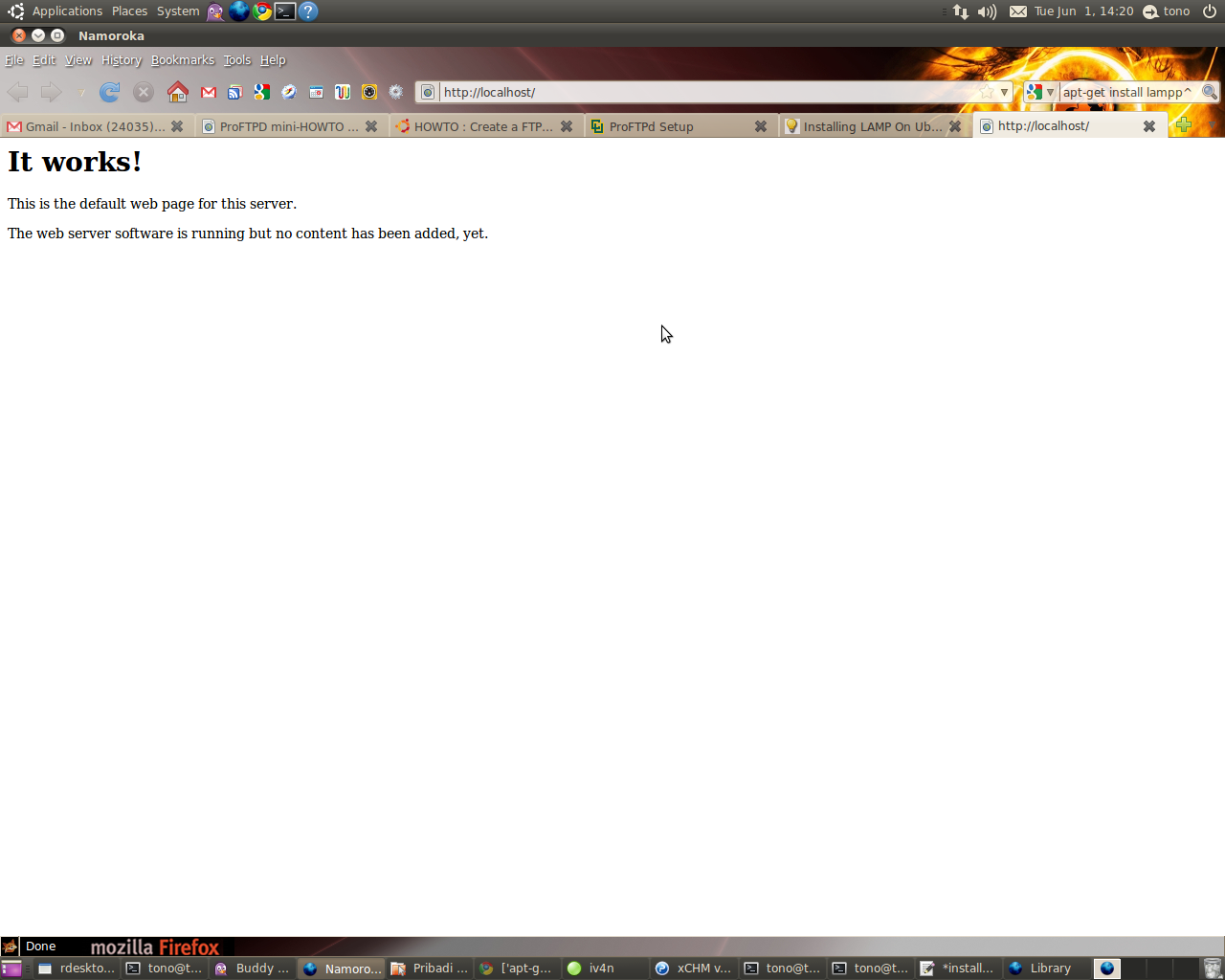
Untuk meyakinkan apakah instalasi Apache sudah berhasil atau belum.. dapat dilakukan pengetesan melalui browser dengan mengarahkan ke link berikut :
 
http://localhost

Bila muncul seperti gambar berikut berarti proses instalasi Apache webserver berhasil.


Install PHP
1. Buka konsol dari terminal kemudian ketikkan command berikut :
sudo apt-get install php5 libapache2-mod-php5

2. Restart webserver dengan menggunakan command :
sudo /etc/init.d/apache2 restart

Test PHP
1. Buat file testing.php pada direktori /var/www/ dengan cara
sudo vim /var/www/testing.php

2. Edit file tersebut dengan menambahkan
< ?php phpinfo(); ?>

3. Cek pada browser ke dengan alamat :
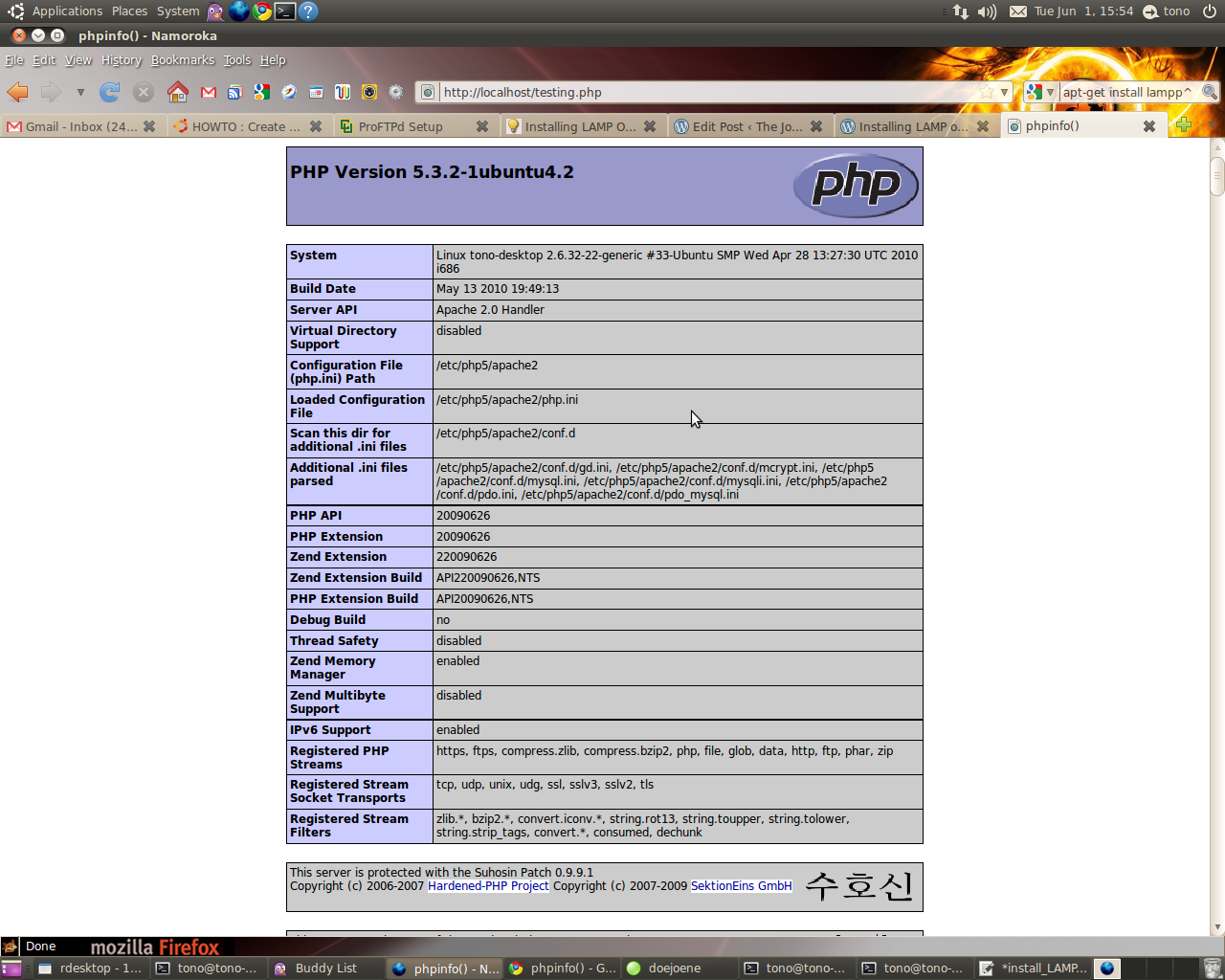
http://localhost/testing.php
Bila instalasi PHP berjalan dengan baik maka akan muncul seperti pada gambar berikut :


Install MySQL
1. Install MySQL dari terminal dengan menggunakan :
sudo apt-get install mysql-server

2. Edit file /etc/mysql/my.cnf dengan menggunakan vim
sudo vim /etc/mysql/my.cnf
Kemudian rubah pada baris
bind-address = 127.0.0.1

menjadi :
bind-address = ip_address_anda

3. Membuat user root pada MySQL dari terminal :
mysql -u root
mysql> SET PASSWORD FOR 'root'@'localhost' = PASSWORD('passwordanda');
Rubah passwordanda dengan password yang anda inginkan.

4. Install aplikasi phpMyadmin agar memudahkan kita dalam mengedit database.
sudo apt-get install libapache2-mod-auth-mysql php5-mysql phpmyadmin 

Selanjutnya agar PHP dapat bekerja dengan MySQL edit file php.ini :
sudo vim /etc/php5/apache2/php.ini

Rubah baris berikut :
;extension=mysql.so
menjadi :
extension=mysql.so

Kemudian restart Apache anda :
sudo /etc/init.d/apache2 restart

have a nice day.. 

re+ thanks bro..

Jumat, 04 Februari 2011

Problem Install Ubuntu 10.10 di toshiba L510 intel core i3

sejak beberap bulan yang lalu saya mencari-cari problem yang terjadi di Laptop Toshiba seri Satellite L510 intel core i3 (karena tidak ada linux/kernel yang support dengan vga, chipset dan processornya) & ( Kernel iDeneb macOSX pun gagal total). selama punya laptop ini kondisinya sangat memprihatinkan, karena hanya bisa di install OS Windows 7 (no XP) & jajaran program applikasinya. Kondisi ini sangat kurang lengkap dengan adanya pekerjaan dibidang Network & programming yang tidak bisa maksimal. Alhasil VirtualBox menjadi satu-satunya cara untuk dapat install Opensource (linux & solaris & BSD ) sebagai sarana jembatan ke network & server yang saya bangun.

Alhasil, diakhir bulan januari kmarin permasalahan itupun selesai dengan coba untuk oprek-oprek system linux yang akan digunakan dengan mengandalkan teori lama. akan saya sharing beberapa trik yg saya pakai untuk mengatasi agar Toshiba L510 intel core i3 dapat berjalan mulus di linux ubuntu ( ujicoba pertama ) :

1. siapkan CD Installasi UBUNTU 10.10
2. Pasang booting laptop via CDROM
3. saat loading booting awal PRESS F6 (UNTUK PILIH LANGUAGE)
4. kemudia PRESS F6 lagi untuk memunculkan menu boot lalu pilih "acpi=off"
5. kemudian ikuti langkah installasinya seperti biasa
6. setelah selesai installasi, saat booting PRESS "E" lalu akan keluar menu boot baru
7. pilih line: Linux /boot/vmlinux-2.6.32......root=UID... PRESS "END" dari keyboard dan tambahkan dibaris paling akhirnya "acpi=off"
8. PRESS Ctrl+X dan kemudian boot
9. akhirnya sampai juga di Ubuntu Desktop (perjuangan belum selesai)
10.  buka "terminal" : Applications > Accessories > Terminal "
11. edit grub.conf dengan cara :
~$ sudo -i
~$ nano /boot/grub/grub.cfg   (enter)
12. cari baris ini :
### BEGIN /etc/grub.d/10_linux ###
menuentry 'Ubuntu, with Linux 2.6.35-25-generic' --class ubuntu --class gnu-linux --class gnu --class os {
        recordfail
        insmod part_msdos
        insmod ext2
        set root='(hd0,msdos4)'
        search --no-floppy --fs-uuid --set cc4dfdfd-f860-494f-9aab-91f7397d8585
        linux   /boot/vmlinuz-2.6.35-25-generic root=UUID=cc4dfdfd-f860-494f-9aab-91f7397d8585 ro   quiet splash acpi=off (ditambahkan acpi=off)
       initrd  /boot/initrd.img-2.6.35-25-generic
}

13. setelah ditambahkan "acpi=off" seperti contoh diatas PRESS CTRL+X - Yes
14. Restart Linux anda.
15. eng-ing-eng.. sudah siap perkerjaan kita, catatan: jangan lupa update grub bila sudah ada waktu : ~#apt-get update-grub
16. Heppy ending

Semoga cara diatas dapat berjalan baik pula di system anda & kemungkinan bisa diaplikasikan di beberapa linux lain yang ingin anda install di Toshiba core i3.

nantikan selanjutnya Install MacOSX ke Toshiba core i3.

Thank all

Regard
yudhax

Unlock/crack Modem ZTE622 IM2 untuk lain Kartu GSM

Pernah berlangganan im2 modem internet access?


dulu saya pernah, 2-3 tahun yang lalu modem ini "most wanted" org pada suka dan mencarinya, tetapi dengan berjalannya waktu, modem dari paket bundling perusahaan indos*t ini berstatus lock/terkunci. jadi tidaka akan bisa dipakai lagi kalau anda berhenti berlangganan dari paket im2. so... bagaimana mengatasinya?


demikian kisahnya:

berikut langkah2 meng-unlock modem 3G ZTE-MF622:


1. Downlot program DC - Unlocker dari salah satu link di bawah ini:


(dapat referensi dari blog kipul)
- http://www.mediafire.com/?lzlekm4lzby
- http://rs968.rapidshare.com/files/377202221/dccrap.zip

2. Selanjutnya anda bisa hubungkan Modem 3G ZTE MF622 ke PC, tapi sebelumnya ganti kartu GSM IM2nya dengan kartu GSM apa aja selain dari operator Indosat, misalkan axis, telkomsel atau XL (PENTING).
3. Ketika muncul program load dashboard modem berlogo IM2 close saja semuanya, langsung ditutup saja.

4. Ekstrak file yg sudah di download td unlock modem dccrap.zip.
5. Masuk ke dalam folder "unlock modem dccrap", kemudian jalankan program dccrap.exe
6. Ganti opsi Select Manufacturer nya menjadi ZTE dan ganti juga opsi Select Modelnya menjadi _Auto detect
7. Klik pada icon kaca pembesar dibawah, hingga kolom di bawah muncul tulisan:

DC - Unlocker 2 Client 1.00.0460

Detecting card :

selection :
manufacturer - ZTE datacards
model - Auto detect

Found modem : MF330
Model : ZTE MF622
IMEI : ..............
Firmware : ..............
SIM Lock status : locked


8. Terakhir, klik pada tombol Unlock (disebelah kanan atas), hingga muncul tulisan:

Unlocking, please wait ...

Card successfully unlocked !

Credits left : 1428100

Success ... setelah proses selesai. Cabut modem 3G ZTE MF622 dari PC, kemudian restart komputer anda. dan sekarang, anda bisa memanfaatkan modem 3G ZTE MF622 kamu dengan kartu operator lain. good luck


yudhax

Setting modem telkomflash Ubuntu 10.10

 Modem telkomsel flash seri E1775 / E1552 / E620

1. download : ( di http://packages.ubuntu.com/lucid/i386/usb-modeswitch/download )
ex:
~#wget http://debian.nctu.edu.tw/ubuntu//pool/universe/u/usb-modeswitch/usb-modeswitch_1.1.0-2_i386.deb

data modeswitch : (http://packages.ubuntu.com/lucid/all/usb-modeswitch-data/download )
ex:
~#wget http://www.club.cc.cmu.edu/pub/ubuntu//pool/universe/u/usb-modeswitch-data/usb-modeswitch-data_20100127-1_all.deb


2. Install :

# dpkg -i usb-modeswitch_1.1.0-2_i386.deb
# dpkg -i usb-modeswitch-data_20100127-1_all.deb

3. Masukkan Modem Huawei.

4. masuk ke : System --> Preference --> Network Connections --> Mobil Broadband --> Add --> pastikan modem huaweinya sidah terditeksi --> Forward --> Country (indonesia) -->> Profider Telkomsel --> Select Plan (pilih my plan not listen) --> isi APN dengan "internet" (tanpa kutip") --> Apply

5. Klik Connect automatically
Number = *99#
username = (kosong)
password = (kosong)
APN = internet
Available to all user = cecklist

APPLY

6. Oke happy enjoy ..

7. untuk matikan & hidupkan koneksi nya : klik kanan tanda wireless/connection network diatas lalu ada pilihan " enable mobile broadband " (v) jika aktif & hilangkan (v) jika off

yudhax

Selasa, 09 Maret 2010

D-Link More Better with Load balancing

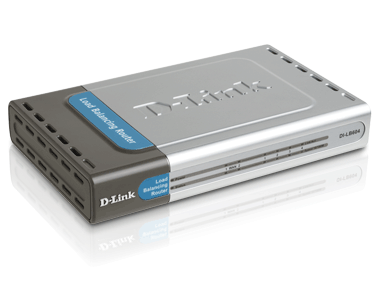
SERI : DI-LB604 4-Port Load Balancing Router (standar)
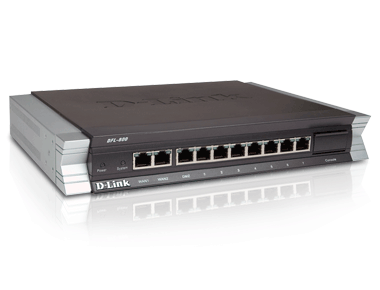
SERI: DFL-800 NetDefend Network Security UTM Firewall, 2 WAN, 1 DMZ, 7 LAN, 90-Day IPS/AV/WCF Subscription (more better)
-0------------0----------------0--------------0-------------

Description

The DI-LB604 Load Balancing Router features dual WAN ports, four LAN ports and firewall protection providing consistent network uptime and reliable Ethernet connection.

--

Description
DFL-800
This easy-to-deploy Desktop VPN Firewall solution is designed for small-to-medium sized businesses and is readily integrated into established networks.

Saat menggunakannya lebih nyaman untuk koneksi dibawah 50user.

mungkin untuk Perkantoran dengan load tinggi dan warnet dengan jumlah koneksi speedy 2bh. dapat direkomendasikan menggunakan alat ini.


Thanks

Yudhax

Senin, 05 Oktober 2009

Mikrotik Load Balancing

Mikrotik Load Balancing

Setting Mikrotik ini Terinspirasi dari blog mas Dwi Nanto dan MikroTik Wiki, dan telah disesuaikan dgn Kondisi..

modem 1
10.10.1.1
|
|
10.10.1.2 ——– MIkrotik Load Balancing — 192.168.0.1 — hub — Client
10.10.2.2
|
|
modem 2
10.10.2.1


Pc-Router Speknya
– Dual P-III - 800Mhz
– Memory 64Mb
– IDE Flash Disk 1 Gb


Konfigurasinya

1. Interface Konfigurasi

/ interface ethernet
set Modem1 name=”Modem1" mtu=1500 \
mac-address=00:10:4B:0D:95:02 arp=enabled \
disable-running-check=yes auto-negotiation=yes \
full-duplex=yes cable-settings=default \
speed=100Mbps comment=”" disabled=no

set Lan name=”Lan” mtu=1500 \
mac-address=00:0D:88:B2:7D:50 arp=enabled \
disable-running-check=yes auto-negotiation=yes \
full-duplex=yes cable-settings=default \
speed=100Mbps comment=”" disabled=no

set Modem2 name=”Modem2? mtu=1500 \
mac-address=00:13:46:2C:DE:13 arp=enabled \
disable-running-check=yes auto-negotiation=yes \
full-duplex=yes cable-settings=default \
speed=100Mbps comment=”" disabled=no


2. Ip Address Konfigurasi

/ ip address
add address=192.168.0.1/24 network=192.168.0.0 \
broadcast=192.168.0.255 \
interface=Lan comment=”" disabled=no

add address=10.10.1.2/24 network=10.10.1.0 \
broadcast=10.10.1.255 \
interface=Modem1 comment=”" disabled=no

add address=10.10.2.2/24 network=10.10.2.0 \
broadcast=10.10.2.255 \
interface=Modem2 comment=”" disabled=no


3. Routing IP

/ ip route
add dst-address=0.0.0.0/0 gateway=10.10.2.1 scope=255 \
target-scope=10 routing-mark=odd \
comment=”" disabled=no

add dst-address=0.0.0.0/0 gateway=10.10.1.1 scope=255 \
target-scope=10 routing-mark=even \
comment=”" disabled=no

add dst-address=0.0.0.0/0 gateway=10.10.1.1 scope=255 \
target-scope=10 comment=”" disabled=no


4. Mangle Marking Paket

/ ip firewall mangle
add chain=prerouting in-interface=Lan \
connection-state=new nth=1,1,0 \
action=mark-connection new-connection-mark=odd \
passthrough=yes comment=”Load Balancing” disabled=no

add chain=prerouting in-interface=Lan \
connection-mark=odd action=mark-routing \
new-routing-mark=odd passthrough=no \
comment=”" disabled=no

add chain=prerouting in-interface=Lan \
connection-state=new nth=1,1,1 \
action=mark-connection new-connection-mark=even \
passthrough=yes comment=”" disabled=no

add chain=prerouting in-interface=Lan \
connection-mark=even action=mark-routing \
new-routing-mark=even passthrough=no \
comment=”" disabled=no

add chain=postrouting out-interface=Lan \
dst-address=192.168.0.2 action=mark-packet \
new-packet-mark=operator-down passthrough=no


5. Buat rule nat-masquerade untuk network 192.168.0.0/24 [IP - Firewall - Nat]

/ ip firewall nat
add chain=srcnat src-address=192.168.0.0/24 \
action=masquerade

add chain=srcnat connection-mark=odd action=src-nat \
to-addresses=10.10.2.2 to-ports=0-65535

add chain=srcnat connection-mark=even action=src-nat \
to-addresses=10.10.1.2 to-ports=0-65535


6. Setting DNS
/ ip dns set
primary-dns=202.134.1.10 secondary-dns=202.134.0.155 \
allow-remote-requests=yes cache-size=4096KiB \
cache-max-ttl=1w cache-used=90KiB

Label: Mikrotik

Minggu, 15 Februari 2009

Chating dalam CMD command Promt

1) Yang kita butuhkan IP Address and Command Prompt .

2) Open Notepad and tulis dibawah ini .....!

@echo off
:A
Cls
echo MESSENGER
set /p n=User:
set /p m=Message:
net send %n% %m%
Pause
Goto A


3) Now save this as "Messenger.Bat".

4) Open Command Prompt.

5) Drag this file (.bat file) over to Command Prompt and press Enter.

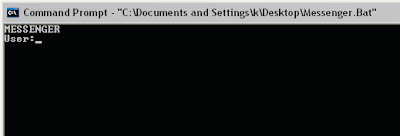
6) You would then see something like this:
 

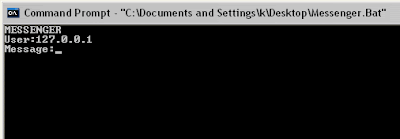
7) Now, type the IP Address of the computer you want to contact and press enter
You will see something like this:
 

8) Now all you need to do is type your message and press Enter.
Start Chatting.......!


Thank kev

Rapidshare Hacking

There are two hacks to beat Rapidshare download limits and waiting time.

1) Rapidshare Hack (For Firefox Users) :-
The hot new Firefox plug-in takes browser customization to a whole new level by letting users filter site content or change page behaviors.
The glory of open-source software is that it allows anyone with the inclination and the scripting knowledge to get under the hood and hot-rod their computing environment. 
But most of the time, that advantage is available only to people with the programming skills to make the changes they want. 

That's where Greasemonkey, a free plug-in for Firefox, comes in -- it simplifies hacking the browser.

Released at the end 2004, Greasemonkey is the latest in a growing arsenal of Firefox customization tools. 
It changes how Web pages look and act by altering the rendering process. 

http://greasemonkey.mozdev.org/

1) Install the Greasemonkey extension>>
http://downloads.mozdev.org/greasemonkey/greasemonkey_0.2.6.xpi
2) Restart Firefox 
3) Go to http://rapidshare.de/files/1034529/rapidshare.user.js.html
4) Right click on rapidshare.user.js and choose "Install User Script". 
5) Run FireFox.
6) From 'File' Menu click on Open File then browse to whereever you saved the 'greasemonkey.xpi' plug-in. 
Open it, wait a couple seconds for the install button becomes active. 
7) Click on it to install this plug-in then CLOSE FIREFOX. 
8) Run FireFox again. 
From the File Menu click on Open File then browse to whereever you saved the 'rapidshare.user.js'. 
9) Open it. 
10) Click the Tools Menu then click on Install User Script then click OK. 
11) Close FireFox. 

The script will let you enjoy "no wait" and multiple file downloads......! 


2) Rapidshare Hack (NIC Tricks and MAC Cloning) :-
Rapidshare traces the users IP address to limit each user to a certain amount of downloading per day. 
To get around this, you need to show the rapidshare server a different IP address.
Here are some methods for doing this-

A] Short-Out the JavaScript:
1) Goto the page you want to download
2) Select FREE button
3) In the address bar put this- javascript:alert(c=0)
4) Click OK
5) Click OK to the pop-up box
6) Enter the captcha
7) Download Your File

B] Request a new IP address from your ISP server:
Here’s how to do it in windows:
1) Click Start
2) Click run
3) In the run box type cmd.exe and click OK
4) When the command prompt opens type the following. ENTER after each new line.
ipconfig /flushdns
ipconfig /release
ipconfig /renew
exit
5) Erase your cookies in whatever browser you are using.
6) Try the rapidshare download again.
Frequently you will be assigned a new IP address when this happens. 
Sometime you will, sometimes you will not. If you are on a fixed IP address, this method will not work. 
If this works for you, you may want to save the above commands into a batch file, and just run it when you need it.

C] Use a proxy with SwitchProxy and Firefox:
1) Download and install Firefox
2) Download and install SwitchProxy
3) Google for free proxies
4) When you hit your download limit, clean your cookies and change your proxy

D] You can use a bookmarklet to stop your wait times:
1) Open IE
2) Right Click On This Link
3) Select Add to Favorites
4) Select Yes to the warning that the bookmark may be unsafe.
5) Name it “RapidShare No Wait”
6) Click on the Links folder (if you want to display it in your IE toolbar)
7) Click OK
8) You may need to close and reopen IE to see it
9) Goto rapidshare and click the bookmarklet when you are forced to wait

Thanks kev

Convert FAT - NTFS / Rubah FAT ke NTFS

To convert a FAT partition to NTFS, perform the following steps. 

1) Open 'Command Prompt'. 

2) At the command prompt, type the following- 

CONVERT [driveletter]: /FS:NTFS. 

'Convert.exe' will attempt to convert the partition to NTFS. 


NOTE :- Although the chance of corruption or data loss during the conversion from FAT to NTFS is minimal, it is best to perform a full backup of the data on the drive that it is to be converted prior to executing the convert command.

Windows Genuine Hack

Membuat Windows Legal sendiri ...

Windows Genuine Hack:- 


1) Download "Windows.Genuine.Advantage.Validation..rar" 
2) Extract It. 
3) Run "installer.bat" file. 
4) Reboot. 
5) Enjoy Your Validated Windows.

http://rapidshare.com/files/115531401/Windows.Genuine.Advantage.Validation..rar

Jalankan Firefox dalam Firefox .. (hot)

How to run Firefox inside Firefox.?

Yup you can run Firefox inside firefox just by typing following url.

How about Opening Firefox inside Firefox which is again in another Firefox..?
Not bad huh? 
And its really easy too just type in this url in Firefox's address bar and there you go! 
Firefox inside Firefox!

copy paste following url in a web browser (mozilla firefox).

chrome://browser/content/browser.xul


Following is the screenshot of this trick (firefox in firefox in firefox, which is again in another firefox)-

basic Denial Of Service (DoS) Attacks

A denial of service (DoS) attack is an attack that clogs up so much memory on the target system that it can not serve it's users, or it causes the target system to crash, reboot, or otherwise deny services to legitimate users.There are several different kinds of dos attacks as discussed below:-

1) Ping Of Death :-
The ping of death attack sends oversized ICMP datagrams (encapsulated in IP packets) to the victim.The Ping command makes use of the ICMP echo request and echo reply messages and it's commonly used to determine whether the remote host is alive. In a ping of death attack, however, ping causes the remote system to hang, reboot or crash. To do so the attacker uses, the ping command in conjuction with -l argument (used to specify the size of the packet sent) to ping the target system that exceeds the maximum bytes allowed by TCP/IP (65,536).
example:- c:/>ping -l 65540 hostname
Fortunately, nearly all operating systems these days are not vulnerable to the ping of death attack.

2) Teardrop Attack :- Whenever data is sent over the internet, it is broken into fragments at the source system and reassembled at the destination system. For example you need to send 3,000 bytes of data from one system to another. Rather than sending the entire chunk in asingle packet, the data is broken down into smaller packets as given below:
* packet 1 will carry bytes 1-1000.
* packet 2 will carry bytes 1001-2000.
* packet 3 will carry bytes 2001-3000.
In teardrop attack, however, the data packets sent to the target computer contais bytes that overlaps with each other.
(bytes 1-1500) (bytes 1001-2000) (bytes 1500-2500)
When the target system receives such a series of packets, it can not reassemble the data and therefore will crash, hang, or reboot.
Old Linux systems, Windows NT/95 are vulnerable.

3) SYN - Flood Attack :- In SYN flooding attack, several SYN packets are sent to the target host, all with an invalid source IP address. When the target system receives these SYN packets, it tries to respond to each one with a SYN/ACK packet but as all the source IP addresses are invalid the target system goes into wait state for ACK message to receive from source. Eventually, due to large number of connection requests, the target systems' memory is consumed. In order to actually affect the target system, a large number of SYN packets with invalid IP addresses must be sent.

4) Land Attack :-
A land attack is similar to SYN attack, the only difference being that instead of including an invalid IP address, the SYN packet include the IP address of the target sysetm itself. As a result an infinite loop is created within the target system, which ultimately hangs and crashes.Windows NT before Service Pack 4 are vulnerable to this attack.

5) Smurf Attack :- There are 3 players in the smurf attack–the attacker,the intermediary (which can also be a victim) and the victim. In most scenarios the attacker spoofs the IP source address as the IP of the intended victim to the intermediary network broadcast address. Every host on the intermediary network replies, flooding the victim and the intermediary network with network traffic.

Result:- Performance may be degraded such that the victim, the victim and intermediary networks become congested and unusable, i.e. clogging the network and preventing legitimate users from obtaining network services.

6) UDP - Flood Attack :- Two UDP services: echo (which echos back any character received) and chargen (which generates character) were used in the past for network testing and are enabled by default on most systems. These services can be used to launch a DOS by connecting the chargen to echo ports on the same or another machine and generating large amounts of network traffic.

Thanks kev

EMail Hacking

All email communications on the internet are possible by two protocols:
1) Simple Mail Transfer Protocol (SMTP port-25)
2) Post Office Protocol (POP port-110)

E-Mail hacking consists of various techniques as discussed below.

1) EMail Tracing :- Generally, the path taken by an email while travelling from sender to receiver can be explained by following diagram.


The most effective and easiest way to trace an email is to analyze it's email headers. This can be done by just viewing the full header of received email.

Recommended Tools
NeoTrace http://www.neotrace.com
VisualRoute http://visualroute.visualware.com
E-MailTracker http://www.visualware.com
-0-------------

others trik

----------------

EMail Forging

 EMail Forging :- Email forging allows an attacker to disguise the source of an email and send it to the victim. Most attackers use this technique to fool the victim into believing that somebody else has send the particular email.
The SMTP protocol makes it extremely easy for an attacker to send forged emails to a remote user.
Typically an attacker carries out email forging by following steps:

1) Start Command Prompt and type the following command-
c:/>telnet smtp.mailserver.com 25 or c:/>telnet mail.domain.com 25 
example:- c:/>telnet smtp.gmail.com 25
The above command opens a telnet connection to the specified remote mail server on port-25. Where port-25 is the default SMTP port on which outgoing mail daemon runs.

2) Once you are connected to the mail daemon of remote mail server, you would be greeted with a message similar to following:-


If you are not familiar with the smtp mail daemon commands then enter the keyword 'help' at daemon which may reveal all the supporting commands as shown below.


3) The correct sequence of commands to be executed is:-
a) helo mailserver1.com
b) mail from:abc@mailserver1.com
c) rcpt to:xyz@mailserver2.com
d) data
e) .(dot command represents end of mail body)
This all as shown in figure below:

 EMail forging by this technique does not possible, if mail relying is disabled by it's service provider.
---

 Spam :- Every e-mail account and network on the internet has limited space and bandwidth. This means that if an attacker is able to clog up all the inbox space and bandwidth of the target computer, it could cause lot of inconvenience and unnecessary trouble. Spam e-mails have slowly but surely started clogging up the bandwidth on the internet and the memory space in our inboxes.

MailBombing:- Mailbombing is a technique wherein the attacker floods victim's e-mail account with an extremely large (sometimes infinite) number of unsolicited meaningless e-mails. Two different types of mailbombing are-

a) Mass Mailbombing
b) List Linking Mailbombing

thanks - kev


Address Resolution Protocol (ARP) Attacks

What Does ARP Mean?
Address Resolution Protocol (ARP) is a stateless protocol, was designed to map Internet Protocol addresses (IP) to their associated Media Access Control (MAC) addresses. This being said, by mapping a 32 bit IP address to an associated 48 bit MAC address via attached Ethernet devices, a communication between local nodes can be made.

On a majority of operating systems, such as Linux, FreeBSD, and other UNIX based operating systems, and even including Windows, the "arp" program is present. This program can be used to display and/or modify ARP cache entries.

An example of the "arp" utility's output would look like the following:

Windows:
> arp -a
Interface: 192.168.1.100 .- 0x10003
Internet Address Physical Address Type
192.168.1.1 00-13-10-23-9a-53 dynamic

Linux:
$ arp -na
? (192.168.1.1) at 00:90:B1:DC:F8:C0 [ether] on eth0

FreeBSD:
$ arp -na
? (192.168.1.1) at 00:00:0c:3e:4d:49 on bge0


How ARP works?
Specifically for Internet Protocol Version 4 (IPv4), ARP maps IP addresses between the Network layer and Data Link layer of the Open System Interconnection (OSI) model.
For a more complete and thorough explanation of how address resolution works, and protocol specifics, please consult RFC 826.


ARP Protocol Flaws :-
ARP's main flaw is in its cache. Knowing that it is possible for ARP to update existing entries as well as add to the cache, this leads one to believe that forged replies can be made, which result in ARP cache poisoning attacks.


Terms & Definitions :-
ARP Cache Poisoning : Broadcasting forged ARP replies on a local network. In a sense, "fooling" nodes on the network. This can be done because ARP lacks authentication features, thus blindly accepting any request and reply that is received or sent.

MAC Address Flooding : An ARP cache poisoning attack that is mainly used in switched environments. By flooding a switch with fake MAC addresses, a switch is overloaded. Because of this, it broadcasts all network traffic to every connected node. This outcome is referred to as "broadcast mode" because, all traffic passing through the switch is broadcasted out like a Hub would do. This then can result in sniffing all network traffic.


The ARP Attacks :-
1] Connection Hijacking & Interception : Packet or connection hijacking and interception is the act in which any connected client can be victimized into getting their connection manipulated in a way that it is possible to take complete control over.

2] Connection Resetting : The name explains itself very well. When we are resetting a client's connection, we are cutting their connection to the system. This can be easily done using specially crafted code to do so. Luckily, we have wonderful software that was made to aid us in doing so.

3] Man In The Middle : One of the more prominent ways of attacking another user in order to hijack their traffic, is by means of a Man In The Middle (MITM) attack. Unlike the other attacks, a MITM is more a packet manipulation attack which in the end however does result in packet redirection to the attacker . all traffic will get sent to the attacker doing the MITM attack. This attack however is specific. As opposed to MAC Address Flooding or other attacks against a router/switch, the MITM attack is against a victim, and also can be done outside of a switched environment. Thus meaning, an attack can be executed against a person on the other side of the country.

4] Packet Sniffing : Sniffing on a Local Area Network (LAN) is quite easy if the network is segmented via a hub, rather than a switch. It is of course possible to sniff on a switched environment by performing a MAC flood attack. As a result of the MAC flood, the switch will act as a hub, and allow the entire network to be sniffed. This gives you a chance to use any sort of sniffing software available to you to use against the network, and gather packets.

5] Denial of Service : MAC Address Flooding can be considered a Denial of service attack. The main idea of the MAC flood, is to generate enough packet data to send toward a switch, attempting to make it panic. This will cause the switch to drop into broadcast mode and broadcast all packet data. This however did not result in a crash, or the service to be dropped, but to be overloaded.


Thanks kev

Basic Network Hacking

Network Hacking is generally means gathering information about domain by using tools like Telnet, NslookUp, Ping, Tracert, Netstat, etc.
It also includes OS Fingerprinting, Port Scaning and Port Surfing using various tools.

Ping :- Ping is part of ICMP (Internet Control Message Protocol) which is used to troubleshoot TCP/IP networks. So, Ping is basically a command that allows you to check whether the host is alive or not.
To ping a particular host the syntax is (at command prompt)-- 
c:/>ping hostname.com

example:- c:/>ping www.google.com

Various attributes used with 'Ping' command and their usage can be viewed by just typing c:/>ping at the command prompt.


Netstat :- It displays protocol statistics and current TCP/IP network connections. i.e. local address, remote address, port number, etc. 
It's syntax is (at command prompt)--
c:/>netstat -n


Telnet :-
Telnet is a program which runs on TCP/IP. Using it we can connect to the remote computer on particular port. When connected it grabs the daemon running on that port. 
The basic syntax of Telnet is (at command prompt)-- 
c:/>telnet hostname.com

By default telnet connects to port 23 of remote computer. 
So, the complete syntax is-
c:/>telnet www.hostname.com port

example:- c:/>telnet www.yahoo.com 21 or c:/>telnet 192.168.0.5 21


Tracert :- It is used to trace out the route taken by the certain information i.e. data packets from source to destination. 
It's syntax is (at command prompt)-- 
c:/>tracert www.hostname.com
example:- c:/>tracert www.insecure.in

Here "* * * Request timed out." indicates that firewall installed on that system block the request and hence we can't obtain it's IP address.

various attributes used with tracert command and their usage can be viewed by just typing c:/>tracert at the command prompt.

The information obtained by using tracert command can be further used to find out exact operating system running on target system.


Thanks -=kevin=-

Rabu, 14 Mei 2008

Safari Browser on Linux


Wanna using Safari Browser on Linux? its easy bro...

This is a four step guide to get Apple’s Safari browser running on Linux.

  1. Run winecfg, set Windows version to WinXP
  2. Copy the core windows fonts: cp /usr/share/fonts/truetype/msttcorefonts/{Arial,Times_New_Roman}*.ttf ~/.wine/drive_c/windows/fonts/
  3. Download Safari for Windows from the Apple homepage
Or using standard command:
root:# wine file.safari.exe

so .. you will enjoyed ....

yudhax