Tampilkan postingan dengan label Training. Tampilkan semua postingan

Sabtu, 25 Oktober 2025

WEB APP PENTESTING CHECKLIST


 Phase 1: Reconnaissance & Information Gathering 🕵️‍♂️

1. Identify the target domain and IP addresses 🌐
2. Enumerate subdomains 🔍
3. Check for DNS records (A, MX, CNAME, TXT) 📋
4. Perform WHOIS lookup for domain registration details 📞
5. Identify technologies used (frameworks, libraries, CMS) 🛠️
6. Check SSL/TLS certificate details 🔒
7. Map the application architecture (frontend/backend/APIs) 🏗️
8. Identify entry points (login forms, APIs, file uploads) 🚪
9. Review robots.txt and sitemap.xml files 🤖
10. Look for exposed directories/files using directory brute-forcing 📂
11. Check for open ports and services 🚪
12. Identify third-party integrations (payment gateways, analytics) 🤝
13. Analyze HTTP headers for security configurations 📑
14. Check for error messages leaking sensitive information ❌
15. Review version control files (.git, .svn) 📁
16. Identify backup files or archives (.bak, .zip) 💾
17. Check for default credentials in documentation 📚
18. Identify any hardcoded secrets in client-side code 🔑
19. Analyze cookies for sensitive data 🍪
20. Map user roles and permissions 🧑‍💼

— 

Phase 2: OWASP Top Ten Categories and Subcategories 🛡️

1. Broken Access Control 🔓
21. Test for unauthorized access to admin pages 🚫
22. Verify role-based access controls 🧑‍💻
23. Check for IDOR (Insecure Direct Object References) 🆔
24. Test for privilege escalation vulnerabilities ⬆️
25. Verify proper session management 🔑
26. Check for missing authorization checks on API endpoints 📡
27. Test for bypassing CAPTCHA mechanisms 🤖
28. Verify access to restricted files or resources 📂
29. Test for improper logout functionality 🚪
30. Check for insecure redirects or forwards ➡️

2. Cryptographic Failures 🔐
31. Check for weak encryption algorithms 🛠️
32. Verify secure storage of sensitive data 🔒
33. Test for plaintext transmission of sensitive data 📡
34. Check for improper certificate validation 🔐
35. Verify HTTPS usage across all pages 🌐
36. Test for weak password hashing mechanisms 🔑
37. Check for exposure of sensitive tokens or keys 🔑
38. Verify secure random number generation 🎲
39. Test for improper handling of cryptographic exceptions ❌
40. Check for insecure use of JWTs (JSON Web Tokens) 📜

3. Injection Flaws 💉
41. Test for SQL injection vulnerabilities 🗄️
42. Check for NoSQL injection vulnerabilities 📊
43. Verify input sanitization for OS commands ⌨️
44. Test for LDAP injection vulnerabilities 📋
45. Check for XSS (Cross-Site Scripting) vulnerabilities 🌐
46. Verify protection against template injection 📝
47. Test for command injection vulnerabilities 💻
48. Check for XPath injection vulnerabilities 📊
49. Verify protection against header injection 📑
50. Test for log injection vulnerabilities 📜

4. Insecure Design 🏗️
51. Review the application’s threat model 🛡️
52. Check for lack of security controls in design 🚫
53. Verify adherence to secure coding practices 🛠️
54. Test for improper error handling mechanisms ❌
55. Check for insecure default configurations ⚙️
56. Verify proper input validation throughout the app 📋
57. Test for insufficient logging and monitoring 📊
58. Check for insecure use of third-party components 🤝
59. Verify secure integration with external systems 🌐
60. Test for inadequate data validation flows 🔄

5. Security Misconfiguration ⚙️
61. Check for unnecessary features enabled 🚫
62. Verify proper configuration of security headers 📑
63. Test for default accounts/passwords 🧑‍💻
64. Check for verbose error messages ❌
65. Verify proper file permissions 📂
66. Test for insecure cloud storage configurations ☁️
67. Check for outdated software versions 🔄
68. Verify secure database configurations 🗄️
69. Test for improper CORS policies 🌐
70. Check for missing security patches 🛠️

6. Vulnerable Components 🧩
71. Identify outdated libraries/frameworks 🔄
72. Check for known vulnerabilities in dependencies 🔍
73. Verify dependency updates are applied regularly 🛠️
74. Test for insecure use of open-source components 🌟
75. Check for unused or redundant components 🚫
76. Verify secure integration of third-party APIs 🌐
77. Test for insecure plugin/module usage 🧩
78. Check for unpatched vulnerabilities in components 🛡️
79. Verify secure handling of component updates 🔄
80. Test for insecure use of custom-built components 🛠️

7. Identification and Authentication Failures 🔑
81. Check for weak password policies 🧑‍💻
82. Verify multi-factor authentication (MFA) implementation 🔒
83. Test for account enumeration vulnerabilities 🆔
84. Check for insecure password recovery mechanisms 🔄
85. Verify session timeout and invalidation 🔑
86. Test for brute-force attack protections 🛡️
87. Check for insecure storage of credentials 🔒
88. Verify secure handling of authentication tokens 📜
89. Test for improper use of remember-me functionality 🧠
90. Check for insecure OAuth implementations 🌐

8. Software and Data Integrity Failures 🔄
91. Verify integrity of downloaded files/updates 📥
92. Check for insecure deserialization vulnerabilities 🧩
93. Test for tampering of client-side data 🔄
94. Verify secure handling of serialized objects 📦
95. Check for improper validation of external inputs 📋
96. Test for insecure use of auto-update mechanisms 🔄
97. Verify secure handling of backups 💾
98. Check for improper validation of digital signatures 📜
99. Test for insecure handling of API responses 📡
100. Verify secure deployment pipelines 🛠️

9. Security Logging and Monitoring Failures 📊
101. Check for insufficient logging of security events 📜
102. Verify proper alerting mechanisms for anomalies ⚠️
103. Test for logging of sensitive data 🔒
104. Check for centralized logging solutions 📊
105. Verify log retention policies 📅
106. Test for real-time monitoring capabilities 🕒
107. Check for correlation of logs across systems 🔄
108. Verify secure storage of logs 🔒
109. Test for detection of brute-force attacks 🛡️
110. Check for logging of failed login attempts 🔑

10. Server-Side Request Forgery (SSRF) 🌐
111. Test for SSRF vulnerabilities in APIs 📡
112. Check for improper validation of URLs 🌐
113. Verify protection against internal network access 🛡️
114. Test for SSRF via metadata endpoints ☁️
115. Check for improper handling of redirects ➡️
116. Verify secure parsing of user-supplied URLs 📑
117. Test for SSRF in image/file processing 🖼️
118. Check for SSRF in email sending functionality 📧
119. Verify secure handling of proxy configurations 🌐
120. Test for SSRF in third-party integrations 🤝

— -

Phase 3: Advanced Vulnerabilities 🚀

1. Advanced Injection Techniques
121. Test for blind SQL injection vulnerabilities 🗄️
122. Check for second-order SQL injection vulnerabilities ⚡
123. Test for time-based blind SQL injection ⏳
124. Verify protection against union-based SQL injection 🛡️
125. Test for stacked queries in SQL injection 📜
126. Check for out-of-band SQL injection vulnerabilities 🌐
127. Test for advanced NoSQL injection techniques 📊
128. Verify protection against GraphQL query injection 📊
129. Test for server-side template injection (SSTI) 📝
130. Check for advanced XSS payloads (DOM-based, stored, reflected) 🌐

2. Advanced Authentication Attacks
131. Test for token replay attacks 🔑
132. Check for JWT none algorithm vulnerabilities 📜
133. Test for JWT signature verification bypass 🛡️
134. Verify protection against OAuth CSRF attacks 🌐
135. Test for session fixation vulnerabilities 🔑
136. Check for improper session regeneration after login 🔄
137. Test for insecure password reset mechanisms 🔄
138. Verify protection against credential stuffing attacks 🛡️
139. Test for insecure single sign-on (SSO) implementations 🌐
140. Check for improper handling of OAuth scopes 📑

3. Advanced Authorization Attacks
141. Test for horizontal privilege escalation ⬆️
142. Check for vertical privilege escalation 🧑‍💻
143. Test for bypassing access controls via API endpoints 📡
144. Verify protection against forced browsing attacks 📂
145. Test for bypassing CAPTCHA during critical workflows 🤖
146. Check for improper handling of user roles in APIs 📡
147. Test for bypassing two-factor authentication (2FA) 🔒
148. Verify protection against business logic flaws in authorization 🔄
149. Test for bypassing rate limits in sensitive operations ⏳
150. Check for improper handling of permissions in microservices 🌐

4. Advanced Business Logic Flaws
151. Test for improper price manipulation in e-commerce apps 💰
152. Check for bypassing payment steps 🛒
153. Verify secure handling of referral bonuses 🎁
154. Test for abuse of discount codes 🛍️
155. Check for improper inventory management 📦
156. Verify secure handling of workflows 🔄
157. Test for abuse of rate limits ⏳
158. Check for improper access to hidden features 🔍
159. Verify secure handling of cancellation flows 🚫
160. Test for abuse of free trials 🕒

5. Advanced Miscellaneous Vulnerabilities
161. Test for insecure WebSocket implementations 🌐
162. Check for improper handling of CORS preflight requests 📡
163. Verify protection against clickjacking attacks 🖱️
164. Test for insecure handling of HTTP headers 📑
165. Check for improper handling of JSONP callbacks 📜
166. Verify protection against host header injection attacks 🌐
167. Test for insecure use of Web Assembly (WASM) 🛠️
168. Check for improper handling of CSP (Content Security Policy) 🛡️
169. Verify protection against XML External Entity (XXE) attacks 📊
170. Test for insecure handling of file uploads (e.g., RCE via uploads) 📂

— -

Phase 4: Report Writing ✍️
171. Include an executive summary 📑
172. Provide a detailed methodology section 🛠️
173. List all identified vulnerabilities 🛡️
174. Include risk ratings for each issue ⚠️
175. Add screenshots for clarity 📷
176. Provide step-by-step reproduction steps 🔄
177. Include remediation recommendations 🛠️
178. Highlight critical findings first 🔥
179. Add references to OWASP guidelines 📚
180. Include a timeline of testing activities 📅
181. Provide a glossary of technical terms 📖
182. Include a disclaimer for limitations 🚫
183. Add contact information for follow-up 📞
184. Verify confidentiality of the report 🔒
185. Proofread for grammar and clarity ✍️
186. Format the report professionally 📄
187. Include a table of contents 📑
188. Add appendices for additional details 📋
189. Verify alignment with client requirements 🤝
190. Include a conclusion with next steps 🚀

— -

Phase 5: Final Steps 🏁
191. Re-test after fixes are applied 🔄
192. Verify patch effectiveness 🛡️
193. Document lessons learned 📚
194. Update the threat model 🏗️
195. Conduct a post-mortem analysis 📊
196. Share findings with stakeholders 🤝
197. Provide training for developers 🛠️
198. Recommend periodic security audits 📅
199. Encourage a security-first mindset 🛡️
200. Celebrate successes 🎉

— 

This checklist provides detailed steps to find web application flaws in 2025 this checklist is for those who are looking to start career in bug bounty or web app security - medium

Rabu, 16 Mei 2012

How to Load balancing Mikrotik - NTH mode

Introduction

This example is improved (different) version of round-robin load balancing example. It adds persistent user sessions, i.e. a particular user would use the same source IP address for all outgoing connections. Consider the following network layout:
LoadBalancing.jpg

Quick Start for Impatient

Configuration export from the gateway router:
/ ip address
add address=192.168.0.1/24 network=192.168.0.0 broadcast=192.168.0.255 interface=Local 
add address=10.111.0.2/24 network=10.111.0.0 broadcast=10.111.0.255 interface=wlan2
add address=10.112.0.2/24 network=10.112.0.0 broadcast=10.112.0.255 interface=wlan1

/ ip firewall mangle
add chain=prerouting src-address-list=odd in-interface=Local action=mark-connection \
  new-connection-mark=odd passthrough=yes 
add chain=prerouting src-address-list=odd in-interface=Local action=mark-routing \
  new-routing-mark=odd passthrough=no
add chain=prerouting src-address-list=even in-interface=Local action=mark-connection \
  new-connection-mark=even passthrough=yes 
add chain=prerouting src-address-list=even in-interface=Local action=mark-routing \
  new-routing-mark=even passthrough=no
add chain=prerouting in-interface=Local connection-state=new nth=2,1 \ 
    action=mark-connection new-connection-mark=odd passthrough=yes
add chain=prerouting in-interface=Local action=add-src-to-address-list \
  address-list=odd address-list-timeout=1d connection-mark=odd passthrough=yes 
add chain=prerouting in-interface=Local connection-mark=odd action=mark-routing \ 
    new-routing-mark=odd passthrough=no
add chain=prerouting in-interface=Local connection-state=new nth=2,2 \ 
    action=mark-connection new-connection-mark=even passthrough=yes
add chain=prerouting in-interface=Local action=add-src-to-address-list \
  address-list=even address-list-timeout=1d connection-mark=even passthrough=yes 
add chain=prerouting in-interface=Local connection-mark=even action=mark-routing \ 
    new-routing-mark=even passthrough=no

/ ip firewall nat 
add chain=srcnat out-interface=wlan1 action=masquerade
add chain=srcnat out-interface=wlan2 action=masquerade

/ ip route 
add dst-address=0.0.0.0/0 gateway=10.111.0.1 scope=255 target-scope=10 routing-mark=odd
add dst-address=0.0.0.0/0 gateway=10.112.0.1 scope=255 target-scope=10 routing-mark=even 
add dst-address=0.0.0.0/0 gateway=10.112.0.1 scope=255 target-scope=10 

Explanation

First we give a code snippet and then explain what it actually does.

IP Addresses

/ ip address 
add address=192.168.0.1/24 network=192.168.0.0 broadcast=192.168.0.255 interface=Local
add address=10.111.0.2/24 network=10.111.0.0 broadcast=10.111.0.255 interface=wlan2 
add address=10.112.0.2/24 network=10.112.0.0 broadcast=10.112.0.255 interface=wlan1 
The router has two upstream (WAN) interfaces with the addresses of 10.111.0.2/24 and 10.112.0.2/24. The LAN interface has the name "Local" and IP address of 192.168.0.1/24.

Mangle

/ ip firewall mangle 
add chain=prerouting src-address-list=odd in-interface=Local action=mark-connection \
  new-connection-mark=odd passthrough=yes 
add chain=prerouting src-address-list=odd in-interface=Local action=mark-routing \
  new-routing-mark=odd 
 
All traffic from customers having their IP address previously placed in the address list "odd" is instantly marked with connection and routing marks "odd". Afterwards the traffic is excluded from processing against successive mangle rules in prerouting chain.

/ ip firewall mangle 
add chain=prerouting src-address-list=even in-interface=Local action=mark-connection \
  new-connection-mark=even passthrough=yes 
add chain=prerouting src-address-list=even in-interface=Local action=mark-routing \
  new-routing-mark=even 
 
Same stuff as above, only for customers having their IP address previously placed in the address list "even".

/ ip firewall mangle 
add chain=prerouting in-interface=Local connection-state=new nth=2,1 \ 
    action=mark-connection new-connection-mark=odd passthrough=yes
add chain=prerouting in-interface=Local action=add-src-to-address-list \
  address-list=odd address-list-timeout=1d connection-mark=odd passthrough=yes 
add chain=prerouting in-interface=Local connection-mark=odd action=mark-routing \ 
    new-routing-mark=odd passthrough=no
 
First we take every second packet that establishes new session (note connection-state=new), and mark it with connection mark "odd". Consequently all successive packets belonging to the same session will carry the connection mark "odd". Note that we are passing these packets to the second and third rules (passthrough=yes). Second rule adds IP address of the client to the address list to enable all successive sessions to go through the same gateway. Third rule places the routing mark "odd" on all packets that belong to the "odd" connection and stops processing all other mangle rules for these packets in prerouting chain.

/ ip firewall mangle 
add chain=prerouting in-interface=Local connection-state=new nth=2,2 \ 
    action=mark-connection new-connection-mark=even passthrough=yes
add chain=prerouting in-interface=Local action=add-src-to-address-list \
  address-list=even address-list-timeout=1d connection-mark=even passthrough=yes 
add chain=prerouting in-interface=Local connection-mark=even action=mark-routing \ 
    new-routing-mark=even passthrough=no
 
These rules do the same for the remaining half of the traffic as the first three rules for the first half of the traffic.
The code above effectively means that each new connection initiated through the router from the local network will be marked as either "odd" or "even" with both routing and connection marks.
The above works fine. There are however some situations where you might find that the same IP address is listed under both the ODD and EVEN scr-address-lists. This behavior causes issues with apps that require persistent connections. A simple remedy for this situation is to add the following statement to your mangle rules:

add chain=prerouting in-interface=Local connection-state=new nth=2,2 \ 
    src-address-list=!odd action=mark-connection new-connection-mark=even \
    passthrough=yes
This will ensure that the new connection will not already be part of the ODD src-address-list. You will have to do the same for the ODD mangle rule thus excluding IP's already part of the EVEN scr-address-list.

NAT

/ ip firewall nat 
add chain=srcnat out-interface=wlan1 action=masquerade
add chain=srcnat out-interface=wlan2 action=masquerade

Fix the source address according to the outgoing interface.

Routing

/ ip route 
add dst-address=0.0.0.0/0 gateway=10.111.0.1 scope=255 target-scope=10 routing-mark=odd 
add dst-address=0.0.0.0/0 gateway=10.112.0.1 scope=255 target-scope=10 routing-mark=even
For all traffic marked "odd" (consequently having 10.111.0.2 translated source address) we use 10.111.0.1

gateway. In the same manner all traffic marked "even" is routed through the 10.112.0.1 gateway.

/ ip route
add dst-address=0.0.0.0/0 gateway=10.112.0.1 scope=255 target-scope=10
 
Finally, we have one additional entry specifying that traffic from the router itself (the traffic without any routing marks) should go to 10.112.0.1 gateway.

 note:
http://wiki.mikrotik.com/wiki/NTH_load_balancing_with_masquerade

Selasa, 29 November 2011

Howto Upgrade PHP 5.1 To 5.2 on CentOS

Summary from centos official - #

This guide describes how to upgrade the standard PHP 5.1.x packages in CentOS 5.x 32-bit to the current development versions 5.2.x. These instructions were created using CentOS 5.3 32-bit and with the following PHP packages installed:

# rpm -qa |grep php

 php-common-5.1.6-15.el5.i386
 php-cli-5.1.6-15.el5.i386
 php-5.1.6-15.el5.i386
 php-pdo-5.1.6-15.el5.i386
 php-bcmath-5.1.6-15.el5.i386
 php-ldap-5.1.6-15.el5.i386
 php-devel-5.1.6-15.el5.i386
 php-gd-5.1.6-15.el5.i386
 php-xml-5.1.6-15.el5.i386
 php-mbstring-5.1.6-15.el5.i386
 php-mysql-5.1.6-15.el5.i386
 php-dba-5.1.6-15.el5.i386

As long as you're using the standard PHP packages on your CentOS server you won't need to do anything extra. If you're using extra PHP packages that aren't part of the standard CentOS repositories (like php-mcrypt) you'll have to remove them or find updated versions of them.

Add the development repositories

First thing we need to do is add the development repositories to yum. When we add the development repository we're going to configure it so it only pulls PHP packages. To start we'll need create a new yum repository configuration file (use your favorite editor):

 # /etc/yum.repos.d/CentOS-Testing.repo

Copy/paste the following into this file:

  # CentOS-Testing:
  # !!!! CAUTION !!!!
  # This repository is a proving grounds for packages on their way to CentOSPlus and CentOS Extras.
  # They may or may not replace core CentOS packages, and are not guaranteed to function properly.
  # These packages build and install, but are waiting for feedback from testers as to
  # functionality and stability. Packages in this repository will come and go during the
  # development period, so it should not be left enabled or used on production systems without due
  # consideration.
  [c5-testing]
  name=CentOS-5 Testing
  baseurl=http://dev.centos.org/centos/$releasever/testing/$basearch/
  enabled=1
  gpgcheck=1
  gpgkey=http://dev.centos.org/centos/RPM-GPG-KEY-CentOS-testing
  includepkgs=php*

Make sure to remove any spaces at the start of each line, then save and close the file and you're done.

Update PHP packages

Before updating your PHP packages you'll want to get a list of what you currently have installed. To get a list of current PHP packages run the following:

 # rpm -qa |grep php

Now you can use yum to update the PHP packages on your system:

 # yum update

You should be shown a list of packages that are going to be updated. Compare it to the list of PHP packages on your system. Note any packages that are not in the list. You'll need to remove these packages or find updates for them because they won't work after you update to PHP 5.2.x. If that is acceptable type "y" to continue and let yum update the packages.

Once yum has completed restart Apache:

 # service httpd restart

To verify the update is working create a simple testing.php in your www directory with the following source code:

  phpinfo();
?>

and open it in a web browser. The new PHP version should be reflected at the top of the page.

Conclusion

You should now have PHP 5.2.6 running on CentOS 5.3 32-bit.

 # rpm -qa |grep php

  php-cli-5.2.6-2.el5s2
  php-mbstring-5.2.6-2.el5s2
  php-devel-5.2.6-2.el5s2
  php-pdo-5.2.6-2.el5s2
  php-gd-5.2.6-2.el5s2
  php-dba-5.2.6-2.el5s2
  php-common-5.2.6-2.el5s2
  php-bcmath-5.2.6-2.el5s2
  php-xml-5.2.6-2.el5s2
  php-pear-1.5.1-2.el5s2
  php-ldap-5.2.6-2.el5s2
  php-5.2.6-2.el5s2
  php-mysql-5.2.6-2.el5s2


 # php -v

  PHP 5.2.6 (cli) (built: Sep 15 2008 20:42:05)
  Copyright (c) 1997-2008 The PHP Group
  Zend Engine v2.2.0, Copyright (c) 1998-2008 Zend Technologies

Note: If your "php -v" output returns errors about PDO or JSON click here

Extras

Updating/Installing mcrypt

If you have php-mcrypt for PHP 5.1.x installed you'll want to remove it:

Note: Your version number maybe different. Alter below command accordingly.

 rpm -e php-mcrypt-5.1.6-15.el5.centos.1

Download php-mcrypt for PHP 5.2.x and install it. You can find a 32-bit php-mcrypt package here FedoraJunkies.

Note: You'll notice the "--nodeps" flag in the example. When you try to install php-mcrypt without it you get an error that php-common-5.2.6-2.el5s2 is missing even though it is installed.

 wget -c http://sourcemirrors.org/scotth/centos/5/php/php-mcrypt-5.2.6-2.i386.rpm
 rpm -i --nodeps php-mcrypt-5.2.6-2.i386.rpm

Restart Apache and you should now see mcrypt information on your testing.php page.

JSON and PDO being loaded twice


When you run the command "php -v" you might see the following errors:

 # php -v

  PHP Warning:  Module 'json' already loaded in Unknown on line 0
  PHP Warning:  Module 'PDO' already loaded in Unknown on line 0
  PHP 5.2.6 (cli) (built: Sep 15 2008 20:42:05)
  Copyright (c) 1997-2008 The PHP Group
  Zend Engine v2.2.0, Copyright (c) 1998-2008 Zend Technologies

This is caused by the following two lines in the /etc/php.ini file:

; Extension JSON
extension=json.so

; Extension PDO
extension=pdo.so

Comment out these lines by adding a ";" in front of "extension=". These two modules are already loaded via these two files:

/etc/php.d/json.ini
/etc/php.d/pdo.ini

Selasa, 04 Oktober 2011

Install LAMP on Ubuntu 10.04 Lucid simply

LAMP tersedia di repo ubuntu standard bawaan Lucid.
Berikut langkah-langkah proses instalasi yang bisa di lakukan.

Install Apache

sudo apt-get install lamp-server^ (gunakan “^”)
lalu ikuti proses instalasinya.. atau dapat pula menggunakan cara :

 
sudo apt-get install apache2

Untuk meyakinkan apakah instalasi Apache sudah berhasil atau belum.. dapat dilakukan pengetesan melalui browser dengan mengarahkan ke link berikut :
 
http://localhost

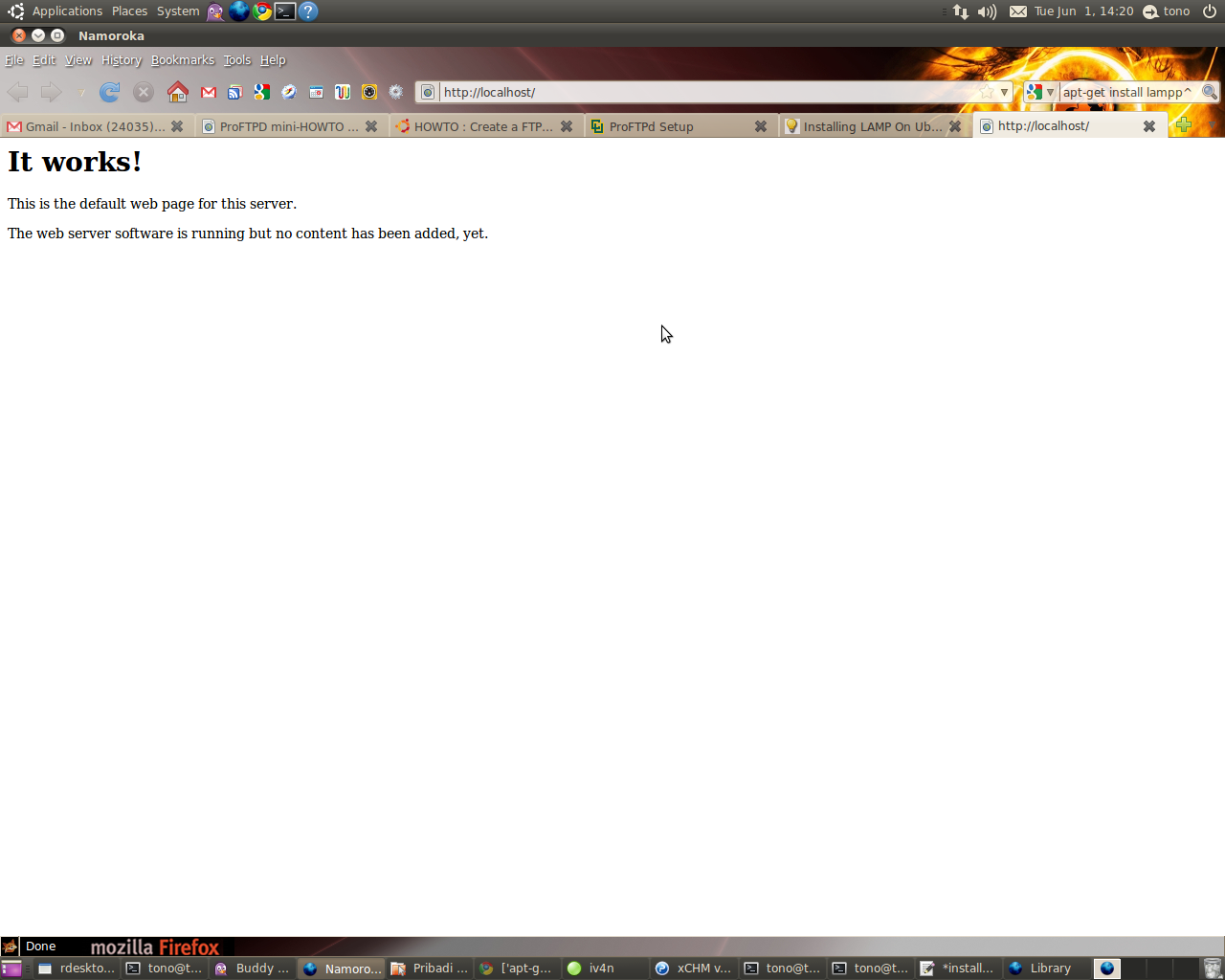
Bila muncul seperti gambar berikut berarti proses instalasi Apache webserver berhasil.


Install PHP
1. Buka konsol dari terminal kemudian ketikkan command berikut :
sudo apt-get install php5 libapache2-mod-php5

2. Restart webserver dengan menggunakan command :
sudo /etc/init.d/apache2 restart

Test PHP
1. Buat file testing.php pada direktori /var/www/ dengan cara
sudo vim /var/www/testing.php

2. Edit file tersebut dengan menambahkan
< ?php phpinfo(); ?>

3. Cek pada browser ke dengan alamat :
http://localhost/testing.php
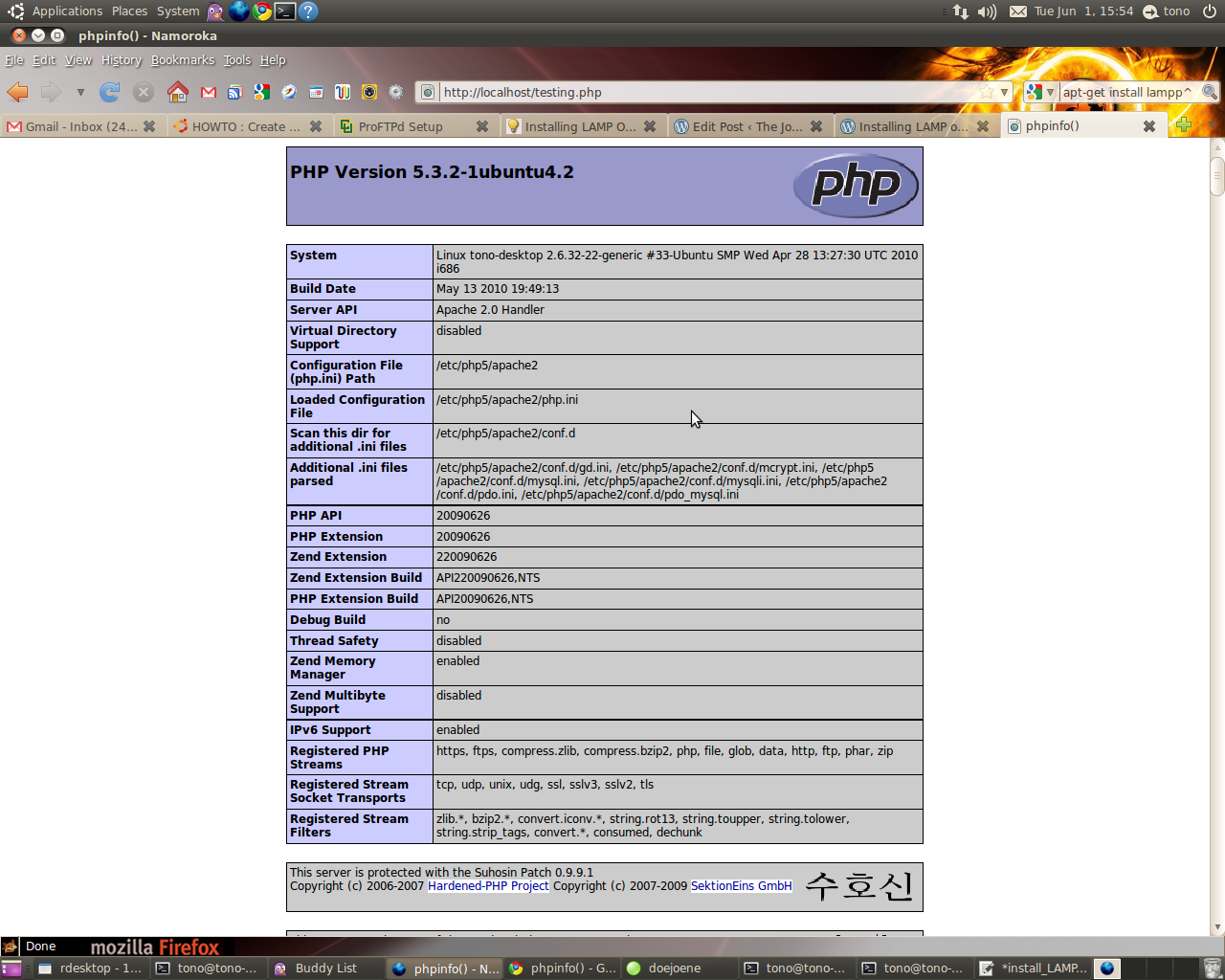
Bila instalasi PHP berjalan dengan baik maka akan muncul seperti pada gambar berikut :


Install MySQL
1. Install MySQL dari terminal dengan menggunakan :
sudo apt-get install mysql-server

2. Edit file /etc/mysql/my.cnf dengan menggunakan vim
sudo vim /etc/mysql/my.cnf
Kemudian rubah pada baris
bind-address = 127.0.0.1

menjadi :
bind-address = ip_address_anda

3. Membuat user root pada MySQL dari terminal :
mysql -u root
mysql> SET PASSWORD FOR 'root'@'localhost' = PASSWORD('passwordanda');
Rubah passwordanda dengan password yang anda inginkan.

4. Install aplikasi phpMyadmin agar memudahkan kita dalam mengedit database.
sudo apt-get install libapache2-mod-auth-mysql php5-mysql phpmyadmin 

Selanjutnya agar PHP dapat bekerja dengan MySQL edit file php.ini :
sudo vim /etc/php5/apache2/php.ini

Rubah baris berikut :
;extension=mysql.so
menjadi :
extension=mysql.so

Kemudian restart Apache anda :
sudo /etc/init.d/apache2 restart

have a nice day.. 

re+ thanks bro..

Senin, 05 Oktober 2009

Mikrotik Load Balancing

Mikrotik Load Balancing

Setting Mikrotik ini Terinspirasi dari blog mas Dwi Nanto dan MikroTik Wiki, dan telah disesuaikan dgn Kondisi..

modem 1
10.10.1.1
|
|
10.10.1.2 ——– MIkrotik Load Balancing — 192.168.0.1 — hub — Client
10.10.2.2
|
|
modem 2
10.10.2.1


Pc-Router Speknya
– Dual P-III - 800Mhz
– Memory 64Mb
– IDE Flash Disk 1 Gb


Konfigurasinya

1. Interface Konfigurasi

/ interface ethernet
set Modem1 name=”Modem1" mtu=1500 \
mac-address=00:10:4B:0D:95:02 arp=enabled \
disable-running-check=yes auto-negotiation=yes \
full-duplex=yes cable-settings=default \
speed=100Mbps comment=”" disabled=no

set Lan name=”Lan” mtu=1500 \
mac-address=00:0D:88:B2:7D:50 arp=enabled \
disable-running-check=yes auto-negotiation=yes \
full-duplex=yes cable-settings=default \
speed=100Mbps comment=”" disabled=no

set Modem2 name=”Modem2? mtu=1500 \
mac-address=00:13:46:2C:DE:13 arp=enabled \
disable-running-check=yes auto-negotiation=yes \
full-duplex=yes cable-settings=default \
speed=100Mbps comment=”" disabled=no


2. Ip Address Konfigurasi

/ ip address
add address=192.168.0.1/24 network=192.168.0.0 \
broadcast=192.168.0.255 \
interface=Lan comment=”" disabled=no

add address=10.10.1.2/24 network=10.10.1.0 \
broadcast=10.10.1.255 \
interface=Modem1 comment=”" disabled=no

add address=10.10.2.2/24 network=10.10.2.0 \
broadcast=10.10.2.255 \
interface=Modem2 comment=”" disabled=no


3. Routing IP

/ ip route
add dst-address=0.0.0.0/0 gateway=10.10.2.1 scope=255 \
target-scope=10 routing-mark=odd \
comment=”" disabled=no

add dst-address=0.0.0.0/0 gateway=10.10.1.1 scope=255 \
target-scope=10 routing-mark=even \
comment=”" disabled=no

add dst-address=0.0.0.0/0 gateway=10.10.1.1 scope=255 \
target-scope=10 comment=”" disabled=no


4. Mangle Marking Paket

/ ip firewall mangle
add chain=prerouting in-interface=Lan \
connection-state=new nth=1,1,0 \
action=mark-connection new-connection-mark=odd \
passthrough=yes comment=”Load Balancing” disabled=no

add chain=prerouting in-interface=Lan \
connection-mark=odd action=mark-routing \
new-routing-mark=odd passthrough=no \
comment=”" disabled=no

add chain=prerouting in-interface=Lan \
connection-state=new nth=1,1,1 \
action=mark-connection new-connection-mark=even \
passthrough=yes comment=”" disabled=no

add chain=prerouting in-interface=Lan \
connection-mark=even action=mark-routing \
new-routing-mark=even passthrough=no \
comment=”" disabled=no

add chain=postrouting out-interface=Lan \
dst-address=192.168.0.2 action=mark-packet \
new-packet-mark=operator-down passthrough=no


5. Buat rule nat-masquerade untuk network 192.168.0.0/24 [IP - Firewall - Nat]

/ ip firewall nat
add chain=srcnat src-address=192.168.0.0/24 \
action=masquerade

add chain=srcnat connection-mark=odd action=src-nat \
to-addresses=10.10.2.2 to-ports=0-65535

add chain=srcnat connection-mark=even action=src-nat \
to-addresses=10.10.1.2 to-ports=0-65535


6. Setting DNS
/ ip dns set
primary-dns=202.134.1.10 secondary-dns=202.134.0.155 \
allow-remote-requests=yes cache-size=4096KiB \
cache-max-ttl=1w cache-used=90KiB

Label: Mikrotik

Rabu, 24 Desember 2008

CISCO Learning & Workshop 2009


Kami menyelenggarakan CISCO Learning & Workshop hari minggu (11 Januari 2009) dari jam 09.00 - 16.00 WIB. 

Acara ini diselenggarakan sebagai pengetahuan basic/advance mengikuti ujian CISCO Sertifikasi. 
Untuk informasi lebih lengkapnya Anda dapat menghubungi sekretariat pendaftaran resmi
ke management ISIC di nomor telp. 0761-62886 atau 0761-8365820 setiap hari kerja.
Biaya registrasi Rp.25.000,- Biaya Learning & Workshop Rp.300.000,-
Segala bentuk pembiayaan harus telah diterima panitia dua hari sebelum tanggal pelaksanaan.
Baik melalui pembayaran langsung maupun transfer. 
Untuk pembayaran melalui transfer, bukti pembayaran harus dikirimkan via fax. di nomor faximile 0761-62886 atau email : greenarya.mg@gmail.com